
The Live Feed appears inside each location panel on your Dashboard. It's a running log that updates instantly whenever a pass is scanned at that location during the current session.
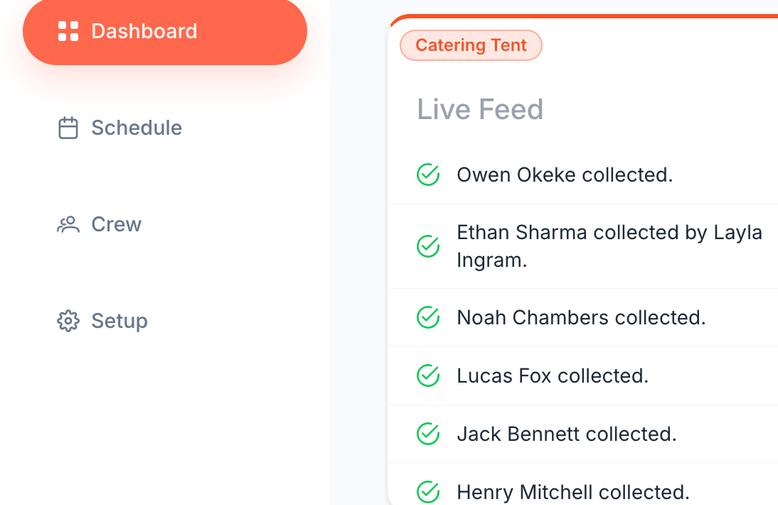
What You'll See
Each entry in the feed includes:
- The crew member's name
- Whether they collected for themselves, someone collected on their behalf, or an admin marked them as collected
- The exact time it happened
Examples:
- "Joe Bloggs collected." → crew member collected for themselves
- "Jane Doe collected by Joe Bloggs." → collected on their behalf (Scan multiple passes or Department quick pickup)
- "Jane Doe collected by admin Joe Bloggs." → an admin manually marked the collection from the web app
- "Meal collected by VIP pass holder: Joe Bloggs." → a VIP pass was scanned
- "Joe Bloggs denied." → a pass was refused (for example, not scheduled for this session)
At unlocked locations (craft, coffee, snacks), every visit gets a line — including repeats and pickups for others:
- "Joe Bloggs collected again." → same person came back for another collection
- "Jane Doe collected again by Joe Bloggs." → another visit collected on their behalf (including via Department quick pickup)
ℹ️ Duplicate scans (locked locations): If someone scans a pass that was already collected in this session, the scanner shows Already scanned (amber). The live feed may still list denied until a backend copy update ships — the meal was not collected twice.
A green tick marks successful collections and a red mark shows denied scans, so problems stand out at a glance.
Why It's Helpful
The Live Feed gives catering and production teams:
- A real-time view of who's collected and when
- Clarity on collections made on behalf of others (including Department quick pickup)
- An instant heads-up when someone's pass is refused, so you can sort it at the hatch
- A quick way to keep track of activity across busy periods — including repeat visits at unlocked sites
The feed shows the current session at that location — for totals from earlier sessions, use the Previous Sessions panel next to it.
And that's the Live Feed — simple, live, and always up to date.
Related Articles